Fit score explained
How Teleport calculates your fit score from 0 to 100, what the labels mean, and why a score can be capped.
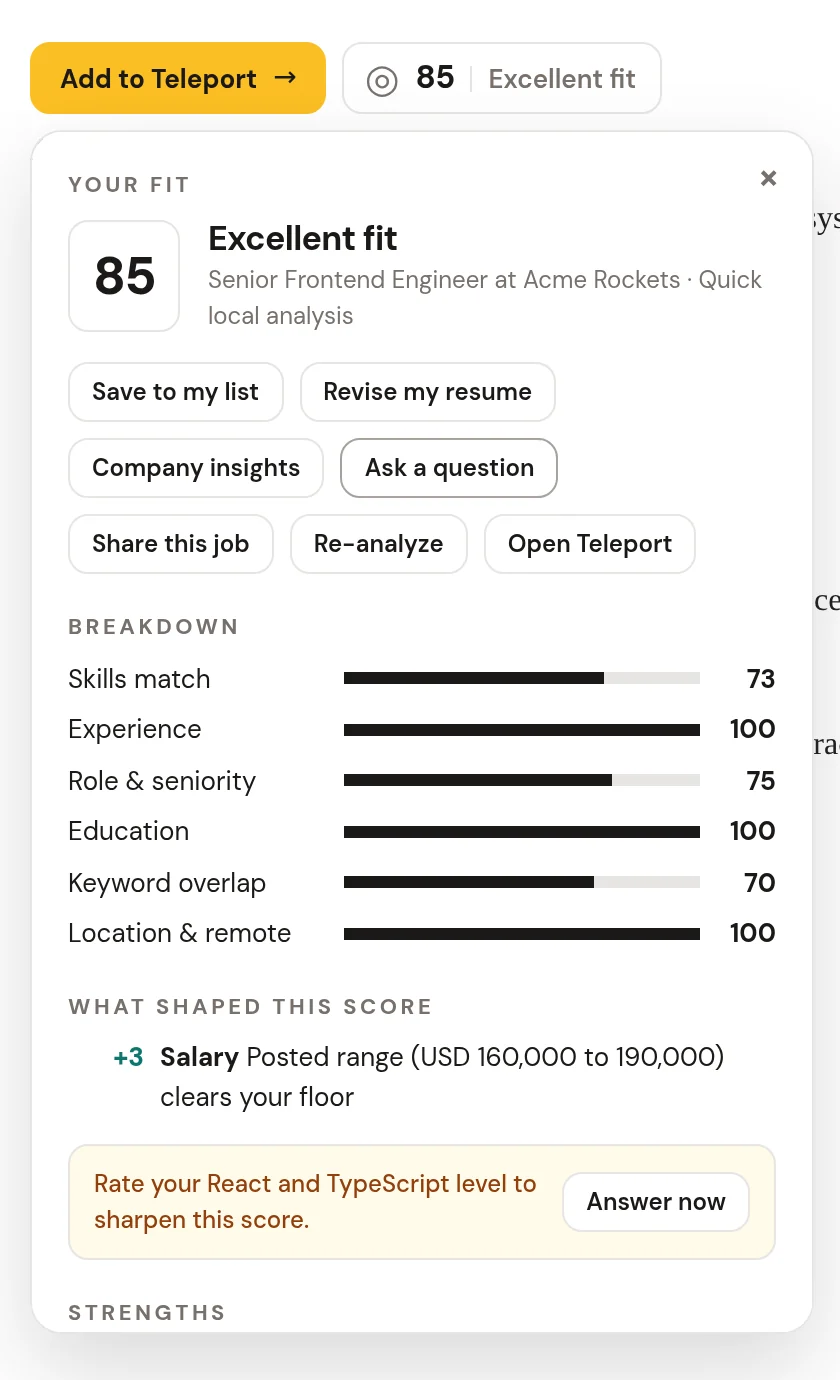
The fit score estimates how well a job matches your profile, from 0 to 100. It's calculated on your device the moment Teleport detects a posting. Click the badge to see the details.
What goes into the score#
| Factor | Weight | What it compares |
|---|---|---|
| Skills | 40% | Skills the posting asks for against your skills, weighted by how central each one is and by your years and level in it |
| Experience | 20% | Years asked for against your years |
| Role and seniority | 15% | The posting's role family and level against your target roles and level |
| Education | 10% | Degree requirements against your education |
| Keyword overlap | 10% | Key terms from the posting that appear in your resume |
| Location and remote | 5% | Remote, hybrid or onsite against your work mode and location |
Labels#
| Score | Label |
|---|---|
| 85 to 100 | Excellent |
| 70 to 84 | Strong |
| 55 to 69 | Good |
| 40 to 54 | Fair |
| Under 40 | Weak |
Eligibility checks#
Some requirements matter more than any skill match. Teleport checks them and adjusts the score:
- Visa sponsorship. If you need sponsorship and the posting says it can't sponsor, the score is capped at 30.
- Citizenship. If the posting requires US citizenship and your profile doesn't match, the score is capped at 30.
- Security clearance. If the posting asks for a higher clearance than you hold, the score is capped at 35. Meeting it adds points.
- Salary floor. If the posted range tops out below your floor, points come off. If it clears your floor, a few are added.
- Relocation. An onsite or hybrid role somewhere else lowers the score if you'd rather not relocate.
Every adjustment is listed under What shaped this score, with the reason.
Strengths, gaps and how to stand out#
The fit panel lists Strengths (what you match), Gaps (what you're missing) and How to stand out (specific next steps), plus a Breakdown of each factor. Gaps you can close with your profile, such as a missing clearance answer, come with Answer now, which takes you straight to that question.
Local engine or AI engine#
Without an AI key, the local engine scores everything on your device. With your own AI key, Teleport asks your model for a deeper read, and falls back to the local engine automatically if the request fails.
Improve your scores#
- Raise your profile completeness, especially skill depth.
- Answer the nudges that appear on postings.
- Click Re-analyze in the fit panel, or Re-score all on Saved jobs, after updating your profile.