Revise my resume
Tailor your resume to a job with suggestions you review one by one, guardrails that block invented facts, and DOCX or PDF downloads.
Revise my resume suggests changes that make your resume speak to one specific job. You review every change, and nothing is added that you haven't stated.
Open it#
- In the fit panel on a posting, click Revise my resume.
- On Saved jobs, open a job and choose Revise my resume.
You need a resume in your profile. If you don't have one yet, Teleport offers Add your resume.
What it suggests#
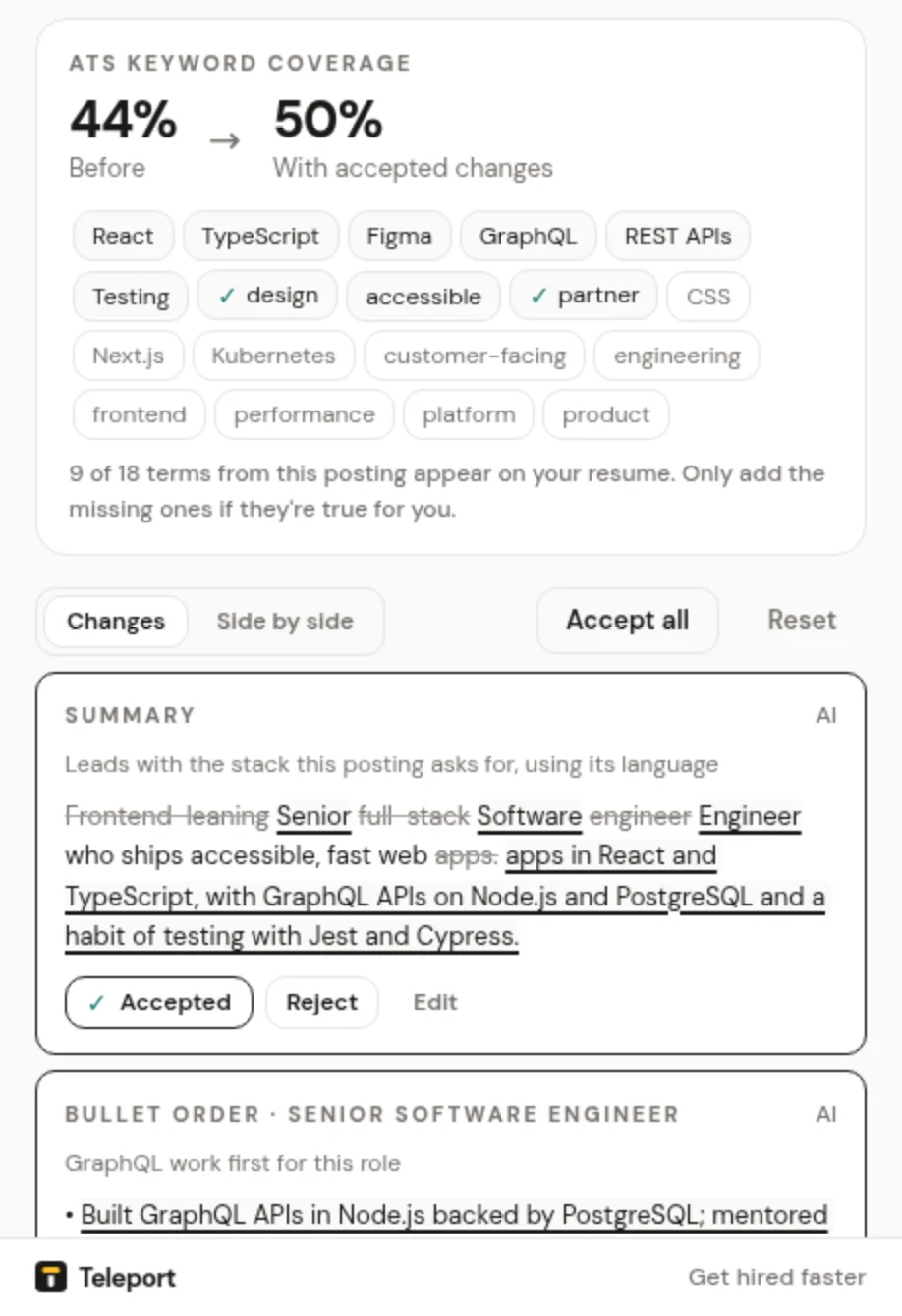
- A summary that opens with your role and the skills this posting cares about.
- Bullets reworded to lead with what you did, using the posting's terms where they match your experience.
- Bullets reordered so the most relevant ones come first under each role.
- A skills list ordered by what this posting asks for.
Alongside the changes you get ATS keyword coverage, Keyword gaps, and Numbers would help for bullets that would be stronger with a metric.
Review the changes#
- Changes lists each suggestion with its reason. Side by side shows your resume next to the revised version.
- Accept, Reject or Edit each change. Use my edit keeps your wording.
- Accept all takes every suggestion. Reset starts the review over.
- Add a number lets you fill in a metric. Until you do, the text shows the placeholder
[add metric].
Guardrails#
Every suggestion, from the local engine or your AI model, is checked against your resume and profile. A suggestion is removed if it adds any of these that you haven't stated:
- an employer
- a job title
- a date
- a degree
- a number or metric
- a skill
Removed suggestions are listed under Teleport removed N suggestions that added facts you haven't stated, each with the reason, for example "added a date not on your resume".
Guardrails reduce the risk of invented facts, but you're responsible for what you send. Read the final version before you apply.
Save and download#
- Save version keeps this revision with the job, under Saved versions. Open or delete versions any time, or Start a fresh revision.
- Download DOCX or Download PDF builds a clean file on your device.
- Copy as text copies plain text for application forms.
With or without AI#
Without an AI key you get a Quick local revision: Teleport reorders and rewords what you already wrote. Click Set up AI to add your own AI key for full rewrites. If the AI request fails, Teleport shows the local revision and tells you why.
With AI on, your resume and the posting are sent directly from your browser to your AI provider.